
Universal remote controls consolidate multiple device operations into one handheld unit, transmitting commands via infrared or radio signals to TVs, decoders, sound systems, and more. They rely on pre-stored codes or learning capabilities to mimic original remotes, simplifying home entertainment setups.
Core Technology: Infrared Signals
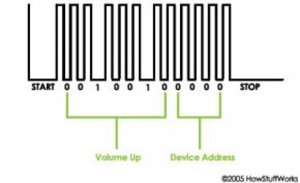
Most universal remotes use infrared (IR) light, invisible to the human eye, operating at wavelengths around 850-950 nanometers. When you press a button, an LED inside the remote flashes rapidly, creating pulses that encode commands like “volume up” or “power on”.
The IR receiver on your device—often a small sensor near the front panel—detects these pulses and decodes them into electrical signals for the device’s microcontroller. This line-of-sight tech requires aiming the remote within 10 meters, as signals can’t penetrate walls or strong sunlight.
Each pulse train follows a protocol: a start burst grabs attention, followed by address bits identifying the device type (TV vs. DVD), command bits (e.g., binary 001 for volume up), and a stop signal. Manufacturers like Samsung or LG use proprietary timings—pulse lengths from 0.5 to 2 milliseconds—making universal remotes store thousands of these code sets.
Programming Methods
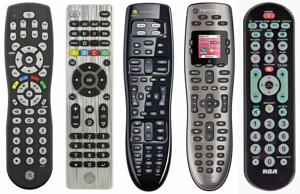
Setup begins with direct code entry: consult the manual’s code list, enter a 3-5 digit number (e.g., 10178 for LG TVs) via the remote’s keypad, then test functions. Auto-scan mode cycles through codes automatically if the exact match is unknown—hold setup until it blinks, point at the device, and press power repeatedly.
Advanced “learning” remotes capture IR signals from originals. Enter learning mode, align the original remote’s nose-to-nose with the universal (1-2 cm apart), press the original’s button—the universal’s IR detector records the exact pulse pattern for replication. This handles rare devices without pre-programmed codes, storing up to 50 commands per device.
Some models support PC programming via USB or apps, downloading custom macros—sequences like “TV on + DSTV input + volume 20″—for one-button execution.
Advanced Features and RF Variants
Macros and soft keys expand utility: program “Movie Night” to dim lights (if smart-integrated), switch inputs, and start playback. Backlit LCD screens show device modes (TV/DVD), battery life, and programmable labels, with aliases letting TV volume work in any mode.
Radio frequency (RF) remotes overcome IR limits, sending 433 MHz signals through walls up to 30 meters. An RF base station or extender in the target room converts RF to IR for legacy devices. Hub-based systems like Logitech Harmony connect via Wi-Fi/Bluetooth, controlling smart TVs over HDMI-CEC alongside IR blasters for non-smart gear.
Bluetooth and Zigbee integrations target modern setups—pair directly with compatible TVs or hubs without line-of-sight.
Internal Components
A microcontroller (e.g., 8-bit MCU) brains the remote, with 32-256 KB flash memory holding code libraries for 8,000+ brands. The IR LED pairs with a photodiode for learning; batteries (AA or rechargeable Li-ion) power bursts drawing 100-200 mA peaks.
Rubber dome switches under buttons provide tactile feedback, while encoders modulate signals—pulse-width modulation (PWM) varies on/off times for 0s and 1s.
Troubleshooting Common Issues
If unresponsive, replace batteries first—low voltage weakens signals. Clean sensors with isopropyl alcohol; reprogram if codes drift. Interference from sunlight or fluorescents? Dim lights or shorten distance. For learning failures, ensure close alignment and fresh batteries in both remotes.
RF models need paired extenders; check hub connectivity for smart variants. Firmware updates via app fix bugs in newer models.
Universal remotes evolve with voice assistants—Alexa/Google integration via hubs—and multi-room audio control, reducing coffee-table clutter for good. Kenyan shoppers at Luthuli Avenue spots like Pro-Logic Technologies stock affordable IR learners from KSh 500, compatible with DSTV, Startimes, and local TVs [ from prior]. Test range and codes in-store for seamless setup.